EN ES PT 中文

Online Stopwatch & Countdown Clock — Hands-Free Timers

Free online stopwatch and countdown clock you can start by voice — works offline

Use nTimers as an online stopwatch, a countdown clock, or both at once. Say "Pasta 12 minutes" or "Emma 10 minutes" and the countdown starts on its own — no tapping, no typing, no stopping what you are doing. Run several named timers at once, all sorted by urgency: perfect for cooking with your hands full, coaching, kids' screen time, workshops and inflatable-game rotations.
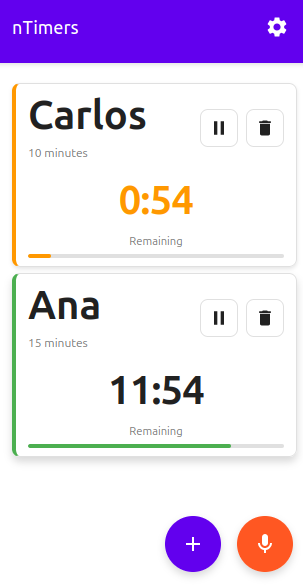
nTimers online stopwatch and countdown clock app showing multiple active timers with visual progress bars

Main Features

nTimers is built around one idea: a timer you start with your voice. When your hands are full — flour on them, oil in the pan, a child on your hip, gloves on at the party — the last thing you want is to unlock a phone and type. Say the name and the time, and the countdown starts.

🎤 Hands-Free Voice Timers

Start a timer by speaking — no tapping, no typing. Say "Pasta 12 minutes", "Emma 10 minutes" or "Workout half an hour" and the countdown is already running, named after whatever you said. A whole busy session — six kids, four dishes, a full class — started without touching the screen.

Several Timers at Once

Run as many timers as you need simultaneously, each with its own name and countdown. Ideal for cooking, training, games, rotations and more.

Visual Alerts

Highlighted red banners show when time is up, with overtime counter.

Pause and Resume

Full control over each timer. Pause and resume whenever you need.

Works Offline

Progressive Web App that works offline. Install it like a native app.

Simple Interface

Intuitive design with large names easy to read from distance.

Online Stopwatch & Countdown Clock

Switch to count-up mode for a simple online stopwatch, or use the normal mode as a countdown clock. Set a duration in minutes or say the hours, minutes and seconds, then pause, resume and run as many as you need.

Free Online Stopwatch & Countdown Clock

Need a simple online stopwatch, or a countdown clock that can keep several things moving at once? nTimers runs in your browser with no download or sign-up. Set a countdown from minutes to hours, or switch to count-up mode and measure elapsed time.

Countdown clock for any duration

Create a clock countdown for pasta, a HIIT interval, a classroom quiz, a screen-time limit or a rental session. Pick a quick preset, type a duration in minutes, or say the hours, minutes and seconds. The timer shows the time left, turns orange near the end and red at zero.

Online stopwatch with count-up mode

Open Settings and turn on Chronometer mode to use nTimers as an online stopwatch. Each timer counts up from zero with pause and resume controls, so you can track elapsed time for workouts, workshops, experiments or games.

Open the free online stopwatch and countdown clock →

How It Works?

  1. Say It (or Tap +)

    Tap the microphone and say the name and the time — "Pasta 12 minutes" — or press + and type it. Either way the timer is created instantly.

  2. Set Time

    Pick a duration from 10 minutes up to several hours (1 h, 2 h, 3 h) — or type your own.

  3. Monitor

    Timers are sorted by urgency. Expired ones appear in red at the top.

Real-world use cases

🍳 Cooking several dishes

Roast in the oven, pasta on the stove and dessert to finish: one timer each, all ready at the same time.

💪 HIIT & interval training

Time each exercise and rest, plus an overall timer for the whole session — no more clock-watching.

👨‍👩‍👧 Kids' screen time

One timer per child, with their name. When it ends the card turns red so they can see it from across the room.

🏰 Inflatable rentals & parties

Track every rental and every rotation of kids without losing sight of pickup time.

🧩 Craft studio & perler-bead shop

One timer per table or customer, with their name and booked time (1, 2 or 3 hours). Extend a session with a single tap if they want to stay longer.

See the craft studio timer →

🏫 Classroom & workshops

A timer per group, for quizzes, presentations or to signal the end of the lesson.

Frequently Asked Questions

Is nTimers free to use?

Yes! nTimers is completely free with no ads, no subscriptions, and no hidden costs. Use it as much as you want.

Does it work offline?

Yes! nTimers is a Progressive Web App (PWA) that works completely offline after your first visit. All your timers will continue to work even without an internet connection.

Can I use nTimers as an online stopwatch?

Yes. Switch on Chronometer mode in Settings and each timer counts up from zero, giving you an online stopwatch with pause and resume controls. You can run several stopwatches at once, and the app needs no sign-up.

How do I set a clock countdown?

Open nTimers, choose or type a duration, and the countdown clock starts immediately. You can also say a name and time, such as "Pasta 12 minutes" or "Oven 1 hour 30 minutes", to start a countdown hands-free.

How many timers can I run at once?

You can run unlimited timers simultaneously. The app is designed to handle multiple timers efficiently, making it perfect for complex tasks like cooking multi-course meals or managing group activities.

Do I need to install anything?

No installation required! Just visit the web app and start using it immediately. However, you can optionally install it to your home screen for quicker access, just like a native app.

Does it work on iPhone and Android?

Yes! nTimers works on all devices including iPhone, Android, tablets, and desktop computers. It's a web app, so it works in any modern browser.

Can I start timers hands-free, with my voice?

Yes — hands-free timers are exactly what nTimers is built around. Tap the microphone and say a name and a duration — "Pasta 12 minutes", "Emma 10 minutes" or "Workout half an hour" — and the timer is created and started for you, without touching the phone. It understands hours, minutes and seconds, plus spelled-out numbers like "twenty five minutes" or "half an hour". Voice recognition needs microphone permission and an internet connection; typing still works offline.

Ready to Go Hands-Free?

Start every timer by voice — free and easy

Open nTimers Now

💡 Tip: You can install the app on your device for quick access